
Back to For You AI Framework

AI Automation Project Structure explained simply

A complete page with beginner explanation, developer-level architecture view, and README-ready folder documentation.

Project structure diagram

Use the button below to view the full AI automation project structure diagram inside this page.

View diagram
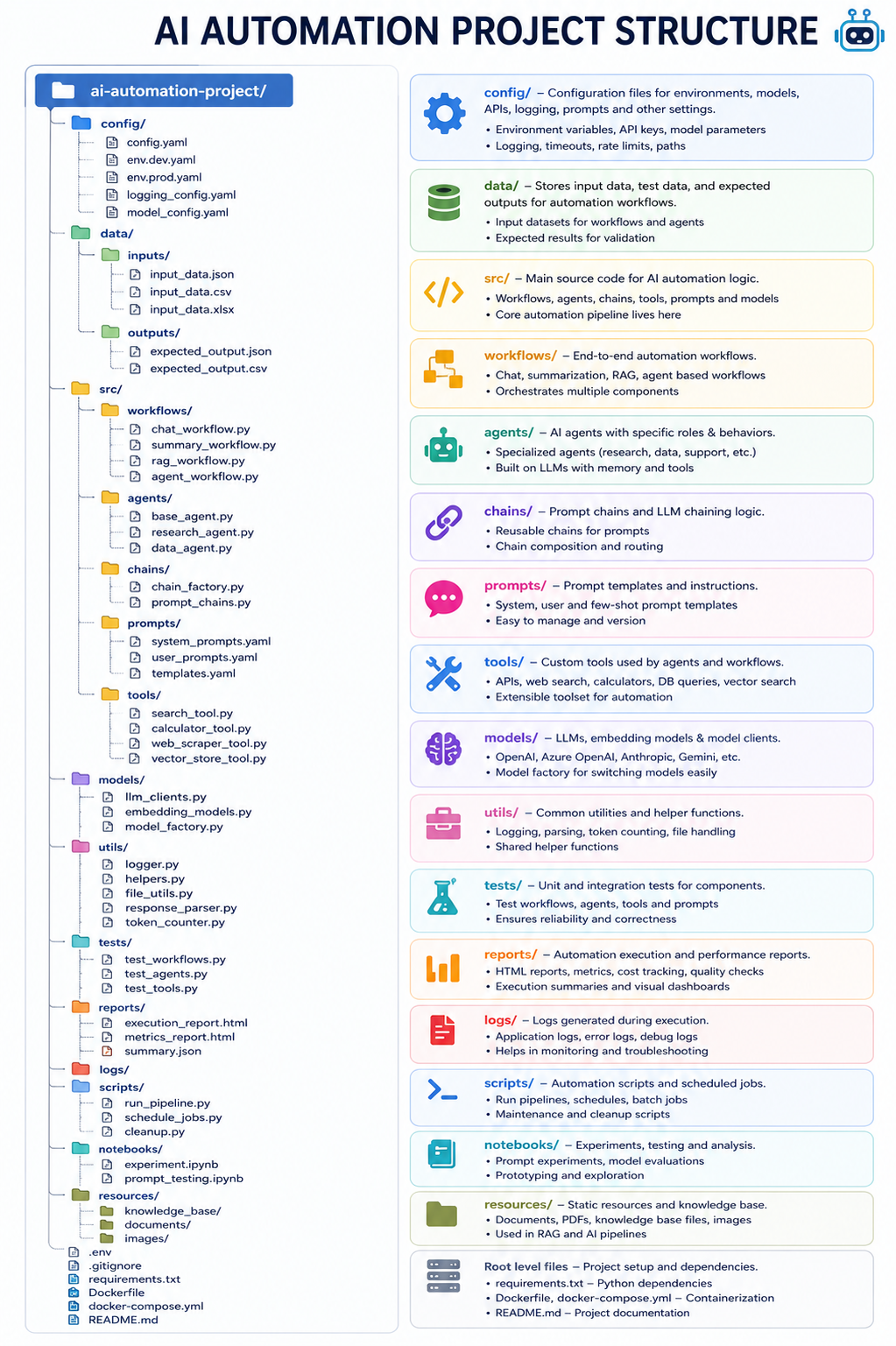
AI Automation Project Structure diagram

What this framework is

This is a clean folder structure for AI automation projects. It separates configuration, workflows, agents, prompts, tools, models, tests, logs, and reports so the project is easier to build and maintain.

Why teams use it: as projects grow, mixing everything in one folder becomes hard to scale. This structure isolates concerns and keeps development predictable.

Beginner view (simple meaning of each part)

Folder
Simple meaning
Example
config/
Project settings
Env values, API keys, logging config
data/
Input/output data files
CSV, JSON, expected outputs
src/
Main project code
Workflows, agents, tools
workflows/
Step-by-step automation flow
chat_workflow.py, rag_workflow.py
agents/
AI helpers with specific role
research_agent.py, data_agent.py
chains/
Linked AI steps
chain_factory.py
prompts/
Prompt templates
system prompts, few-shot templates
tools/
Extra capabilities
search, scraper, calculator
models/
Model connectors
OpenAI/Anthropic/Gemini clients
utils/
Shared helpers
parsing, file handling, logging
tests/
Code verification
unit + integration tests
reports/
Run summaries
metrics and HTML reports
logs/
Error/activity records
runtime and debug logs
scripts/
Runnable tasks
run_pipeline.py, cleanup scripts
notebooks/
Experiments
prompt_testing.ipynb
resources/
Reference assets
PDFs, docs, KB files

Developer-level architecture

  • Configuration layer: centralize env, provider keys, retry/timeouts, model selection.
  • Domain layer: keep workflows orchestration-focused; move reusable logic to agents/chains/tools.
  • Model abstraction: use model adapters + model factory so providers can be swapped by config.
  • Prompt management: keep prompts versioned outside business logic for rapid iteration.
  • Quality layer: deterministic tests with fixtures, plus report generation for accuracy/latency/cost.
  • Observability: structured logs per workflow step and tool call for easier debugging.

Typical request flow

  1. Workflow receives request and context.
  2. Relevant agent/chain is selected.
  3. Prompt templates and model config are loaded.
  4. Tools are called if needed (search/RAG/DB/etc.).
  5. Model output is parsed and validated.
  6. Results are returned and saved in logs/reports.

README-ready folder-by-folder documentation

ai-automation-project/
├── config/
├── data/
├── src/
├── tests/
├── reports/
├── logs/
├── scripts/
├── notebooks/
├── resources/
├── .env
├── .gitignore
├── requirements.txt
├── Dockerfile
├── docker-compose.yml
└── README.md
  • .env: local secrets and runtime environment values.
  • requirements.txt: Python dependency lock list for reproducible setup.
  • Dockerfile/docker-compose.yml: containerized and multi-service execution.
  • README.md: project overview, setup, usage, testing, deployment notes.

Best practices for this architecture

  • Do not hardcode model/provider keys in source files.
  • Keep prompts out of workflow business logic.
  • Avoid putting orchestration decisions inside tools.
  • Write unit tests for tools/utils; integration tests for workflows.
  • Track quality with reports (accuracy, latency, token cost).
  • Move notebook prototypes to `src/` when stable.